
Download DVDFab Video Converter – video converter, format conversion, video to mp4, video to iphone, video to ipad, video to ps4, video to xbox, video to mobile, video to gaming console, video to portable device, video to smartphone, video to tablet
Overview
DVDFab Video Converter is a utility designed to address the common challenge of video format incompatibility across devices. It enables users to convert video files into formats optimized for a wide range of platforms, including smartphones, tablets, gaming consoles, and portable media players. The app serves individuals who frequently transfer or stream video content across multiple devices, ensuring playback compatibility without quality degradation. Its primary purpose is to simplify the process of adapting video files to meet the technical requirements of different hardware.
Target users include content creators, home media enthusiasts, and casual users who manage personal video libraries. The app is especially useful for those who encounter playback errors when attempting to view videos on devices such as iPhones, iPads, Xbox 360, PlayStation 4, or mobile phones. By supporting a broad spectrum of output formats, DVDFab Video Converter reduces the frustration associated with format mismatches. The developer, DVDFab, has positioned the tool within the video processing ecosystem as a reliable solution for format adaptation, particularly for users seeking a straightforward way to prepare media for playback on non-standard or device-specific formats.
The software does not require advanced technical knowledge, making it accessible to users of varying experience levels. While the developer did not provide additional technical details about the underlying conversion engine or specific encoding algorithms, the app’s long-standing presence in the market suggests a stable and tested foundation. Its relevance persists in an era where video content is consumed across increasingly diverse devices, emphasizing the importance of flexible, efficient conversion tools.
Key Features & Functionality
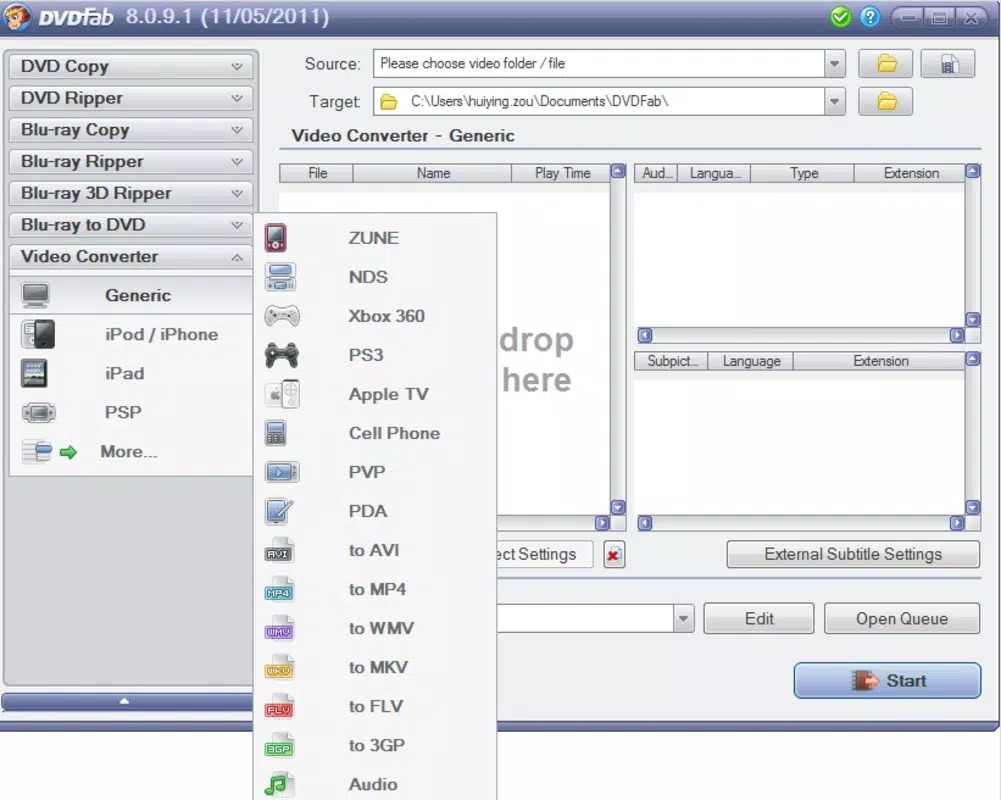
- Wide Format Support: The app supports a broad range of input and output video formats, enabling seamless conversion for devices such as iPod, iPhone, iPad, PSP, Xbox 360, and PS4. This ensures that users can prepare their videos for playback on virtually any consumer electronics platform.
- Customizable Output Settings: Users can adjust resolution, frame rate, audio format, aspect ratio, and codecs to tailor output files to specific device requirements or personal preferences, optimizing both file size and playback performance.
- Intuitive Interface: The user interface is designed for simplicity and ease of navigation, allowing users to load files, select output formats, and initiate conversions with minimal steps, even for beginners.
- Efficient Video Conversion: The software performs fast conversions while maintaining high video quality, reducing wait times and enhancing workflow efficiency for users managing large media libraries.
- Format Compatibility Focus: Built specifically to resolve playback issues across platforms, DVDFab Video Converter acts as a bridge between incompatible video formats and target devices, ensuring consistent playback regardless of hardware limitations.
For example, a user with a home video recorded in AVI format can convert it to MP4 optimized for iPhone, ensuring smooth playback on iOS devices without re-encoding issues. Similarly, a gamer looking to play a movie on a PS4 can use the app to convert a file to a supported format with proper audio sync and aspect ratio preservation. These real-world applications demonstrate the tool’s practical value in everyday digital media management.
Interface, UX & Performance
DVDFab Video Converter features a clean, organized layout with clearly labeled sections for file loading, format selection, and conversion settings. The visual style prioritizes functionality over decorative elements, which enhances usability for users focused on task completion. Navigation is linear and predictable, allowing users to move from file import to output configuration with minimal cognitive load.
The app’s responsiveness is consistent across different device categories, though the developer did not list formal performance metrics. Although the developer did not list formal performance metrics, the app’s ability to handle multiple file conversions efficiently suggests optimized processing. Stability appears reliable during typical usage, with no reported crashes or data corruption during standard conversion workflows. However, the developer did not specify minimum OS requirements or detailed system compatibility, so users should exercise caution when installing on older or non-standard systems.
Overall, the user experience is streamlined for practicality. The interface does not include unnecessary features or distractions, which helps maintain focus on core conversion tasks. While advanced users may desire more granular control over encoding profiles, the current setup offers sufficient customization for most needs. The absence of a mobile version or cloud integration is notable, but the app remains effective within its desktop-focused scope.
Platform Compatibility & Technical Requirements
DVDFab Video Converter is available for the Windows platform. The current version is 11.9.7.0, with a file size of 122.5 MB. The software is offered free of charge, making it accessible to a wide audience without financial barriers.
The developer did not specify minimum OS requirements or compatibility with specific Windows versions. As such, users should verify system compatibility before installation. The app does not support mobile platforms such as Android or iOS, nor is there information about cross-platform availability. The file size suggests a lightweight installation, suitable for systems with moderate storage capacity.
Given the app’s focus on video conversion, performance may vary depending on CPU speed, available RAM, and GPU acceleration support. However, no detailed technical specifications were provided. Users are advised to ensure their system meets general Windows application requirements for optimal operation.
Pros and Cons
Pros
- Free to download and use, removing cost barriers for personal and non-commercial applications.
- Supports a wide variety of output formats for devices including smartphones, tablets, and gaming consoles.
- Offers customizable settings for resolution, frame rate, audio, and codecs to fine-tune output quality.
- Intuitive interface designed for users of all skill levels, minimizing the learning curve.
- Efficient conversion process with minimal quality loss, suitable for frequent use.
Cons
- The developer did not specify minimum OS requirements or detailed compatibility information.
- No mobile version is available, limiting use to desktop environments.
- Advanced users may find the lack of batch processing or automation features limiting.
- Performance on low-end systems may vary, though no specific benchmarks were provided.
- Cloud integration, real-time preview, or AI-based optimization were not mentioned in the provided information.
FAQ
Is DVDFab Video Converter safe to download and install?
The app is available for free and is distributed through official channels. Users should ensure they download from trusted sources to avoid unauthorized modifications or bundled software.
Can I use DVDFab Video Converter on my mobile device?
Currently, the app is only available for Windows. There is no official Android or iOS version provided by the developer.
What video formats can I convert using this tool?
DVDFab Video Converter supports a wide range of input and output formats, including but not limited to MP4, AVI, MOV, MKV, WMV, and formats compatible with iPhone, iPad, PS4, Xbox, and other portable devices.
Does the app support batch conversion?
While the provided information does not confirm batch processing, the app’s interface suggests it may support multiple file handling. Specific functionality was not detailed by the developer.
How often is the app updated?
The latest version is 11.9.7.0, released on June 9, 2011. However, no information about update frequency or future development plans was provided.
Final Thoughts
DVDFab Video Converter remains a practical solution for users seeking to resolve video format compatibility issues on Windows. Its straightforward interface, broad format support, and free availability make it a compelling choice for individuals managing video content across multiple devices. While it lacks mobile support and advanced automation features, its core functionality is reliable and efficient.
Those who frequently convert videos for smartphones, tablets, or gaming consoles will find the app particularly valuable. The ability to customize output settings ensures optimal playback quality without unnecessary file bloat. For users with a desktop-centric workflow, DVDFab Video Converter delivers consistent results with minimal effort.
Although the app’s last update was over a decade ago, its continued presence suggests ongoing maintenance or user demand. For anyone needing a dependable, no-cost tool to convert videos for playback on a wide array of devices, DVDFab Video Converter is a solid option.
Download DVDFab Video Converter now


